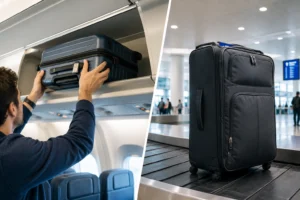
Most travel tech lists sell a fantasy of perpetual, frictionless productivity on the road. They treat your suitcase like an extension of a Silicon Valley desk, filling space with gadgets that look brilliant in promotional videos but turn into dead weight the moment you navigate a crowded subway or a cramped budget airline seat.
The reality of travel is physical: every extra cable, heavy power brick, and gimmicky electronic toy adds drag to your shoulders and clutter to your routine. True travel tech should solve specific, recurring frictions—dying batteries in unfamiliar neighborhoods, neck strain from hunching over a hotel desk, or the scramble for a single wall outlet in a busy cafe.
Before you buy into the next viral gadget, you need to know what genuinely earns its place in your bag and what belongs back on the shelf.
Quick Verdict: Is Travel Tech Worth Upgrading?
- Recommendation: Invest selectively in multi-tasking power solutions and ergonomic comfort, but ruthlessly cut single-use accessories.
- Who should buy: Digital nomads, hybrid remote workers, and heavy content consumers who spend extended hours away from fixed power sources.
- Who should skip: Casual vacationers whose entire digital footprint fits comfortably on a smartphone with a standard wall block.
- Biggest trade-off: Premium tech gear saves physical strain and time, but it adds financial cost and forces you to manage lithium battery limits through airport security.
Quick Facts
| Information | Details |
| Best Investment | Multi-port high-wattage chargers and ultra-thin pocket power banks |
| Budget Expectation | $20 to $120 depending on power output and ergonomic needs |
| Primary Friction | Wall outlet scarcity, dead phone batteries mid-excursion, wrist/neck fatigue |
| Core Rule | If a gadget performs only one function that your phone or laptop already handles better, leave it at home. |
What Travel Tech Is Actually Like on the Road

When you step outside your normal routine, your relationship with technology shifts. At home, a dead mouse or a missing dongle is a minor annoyance; on the road, it can derail a navigation route, delay a train ticket purchase, or stall a remote work deadline.
The environment is harsher on gear than a living room desk. Cafe tables are sticky, hostel outlets are loose, airport floors are dusty, and backpacks take daily beatings in overhead bins. Devices that rely on delicate moving parts or sensitive materials quickly show their flaws.
Travel tech must be resilient, intuitive, and mechanically simple. If a tool requires a five-minute configuration process every time you sit down to work, you will eventually stop using it.
What Is Worth Your Time, Money, and Weight
Not all travel electronics are created equal. The gear that genuinely justifies its footprint falls into two categories: power management and ergonomic survival.
1. Ultra-Thin Pocket Power Banks
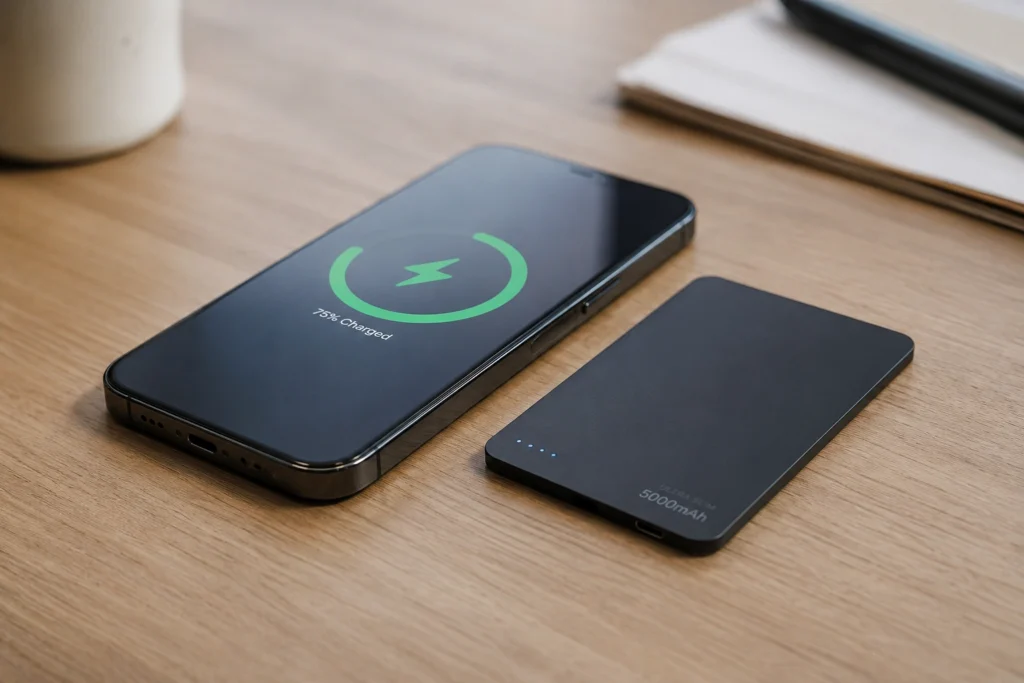
A standard heavy-duty battery bank is great for multi-day backcountry treks, but for city exploration, weight matters. Ultra-thin, credit-card-sized battery banks (such as the Clutch Charger V2) change the equation by sliding directly into a jeans pocket or small sling alongside your phone.
Offering around 3,000 mAh of power, they aren’t designed to run a heavy laptop for hours, but they will pull a dead smartphone back from zero to eighty percent while you navigate a foreign transit map.
- Why it’s worth it: It removes the tether to a wall plug without adding bulk to your daily carry.
- Who it suits: Urban explorers, day-trippers, and solo travelers navigating unfamiliar cities.
2. High-Wattage Multi-Port Wall Chargers
Hotel rooms and Airbnbs rarely have outlets where you want them. A multi-port charging brick (like the Anker PowerPort Atom PD 4) allows you to power a laptop, phone, tablet, and headphones simultaneously from a single wall socket.
- Why it’s worth it: It eliminates the scramble for multiple wall plugs and condenses four separate chargers into one neat block with a detachable cord.
- Who it suits: Anyone traveling with more than one electronic device who wants to cut clutter from their tech pouch.
3. Portable Ergonomic Laptop Stands
Working from a low hotel desk or a kitchen island invariably leads to neck strain and hunched shoulders. A lightweight, folding laptop stand (such as the Roost V3) elevates your screen to eye level and packs down into a slim profile that slips easily into a backpack laptop sleeve.
- Why it’s worth it: It transforms any sketchy accommodation desk into a sustainable ergonomic workstation, preventing repetitive strain injuries on long trips.
- Who it suits: Digital nomads and remote professionals working on the road for weeks at a time.
What To Skip And What To Do Instead
The market is flooded with clever tech accessories designed to solve problems you likely won’t encounter. Knowing what to bypass saves both money and baggage space.
- Skip Silicone Roll-Up Keyboards: They look futuristic and promise water-resistant typing, but their mushy tactile feel, slow response times, and awkward wired connections make actual work frustrating. Instead: If you need a physical keyboard for heavy typing, invest in a compact, low-profile mechanical or scissor-switch wireless keyboard that actually feels like a real writing tool.
- Skip Redundant Laptop Hubs & Docks: Carrying heavy multi-port dongles packed with legacy ports you never use adds unnecessary weight. Instead: Audit your actual port needs before you leave. Most modern setups only require a simple USB-C hub with an HDMI port and a couple of USB-A slots.
- Skip Single-Use Content Stands: Flimsy plastic phone stands often topple over under the weight of modern camera modules or larger smartphones. Instead: Opt for a robust, micro-sized tripod (such as the JOBY GripTight series) that doubles as a tabletop viewing stand and a legitimate pocket tripod for group photos.
What It Really Costs
Building a functional travel tech kit requires realistic budgeting.
- The Minimalist Budget ($30–$50): Focuses purely on survival. A compact pocket power bank and a basic dual-port wall charger. This covers emergency phone power without breaking the bank.
- The Remote Worker Setup ($100–$250): Adds a high-output multi-port charging brick, an ergonomic laptop stand, and a dependable travel mouse or compact hub. This is the sweet spot for productivity and comfort.
- The Content Creator Tier ($300+): Incorporates specialized mini-tripods, portable lighting kits, and high-capacity fast-charging power stations for cameras and laptops.
Final Recommendation
The best travel tech is invisible. It shouldn’t demand your constant attention, require specialized maintenance, or weigh down your pack. If your trip is primarily about leisure and disconnection, leave the heavy tech at home and rely on a single smartphone.
But if your travels involve remote work, navigation across complex urban environments, or capturing memories on the move, invest in reliable power and smart ergonomics. Strip away the gimmicks, pack light, and keep your focus on the destination rather than your cables.
Frequently Asked Questions
Are portable chargers allowed in airplane carry-on bags?
Yes, lithium-ion battery banks and power banks must be packed in your carry-on luggage, never in checked baggage. Airlines restrict most consumer power banks under 100 watt-hours (Wh) without prior airline approval. Always check individual carrier guidelines before heading to the airport.
Do I need a universal travel adapter or a dedicated multi-port charger?
A universal travel adapter changes physical plug shapes to match foreign wall sockets, whereas a multi-port charger steps down and distributes electrical current. If you travel internationally across different socket standards, you will still need a compact physical adapter, but pairing it with a multi-port charger ensures you can charge multiple devices at once.
Is a laptop stand really necessary for short trips?
If your trip is under a week and you only check email casually on your phone, a laptop stand is dead weight. However, if you are working remotely for two weeks or more, the postural correction provided by a portable stand prevents significant neck and shoulder fatigue.
How can I prevent my electronics from overheating in hot climates?
Direct sunlight and high ambient temperatures are the primary enemies of lithium batteries. Avoid leaving phones, tablets, or battery banks in closed vehicles, dashboard mounts, or sun-baked daypacks. Keep your tech in shaded, ventilated compartments while exploring warm destinations.